
Tasks and projects
What you are working on, grouped into projects, and attached to the sessions you run.
A sprint with a name is a different thing from a sprint. Naming the task before you start is what turns twenty-five minutes of working into twenty-five minutes of working on this, and it is what lets Porotimer tell you afterwards where the time went.
Tasks
Every task can carry a due date and belongs to a project. The list gives you what you need to find one quickly: a search field, filters for Today, This Week, This Month and Overdue, sorting by due date, and grouping so tasks sit under their project.
Completed tasks stay visible, struck through, until you hide them — a finished list is worth looking at.
Projects
A project is a container with a name, an emoji and an optional due date.
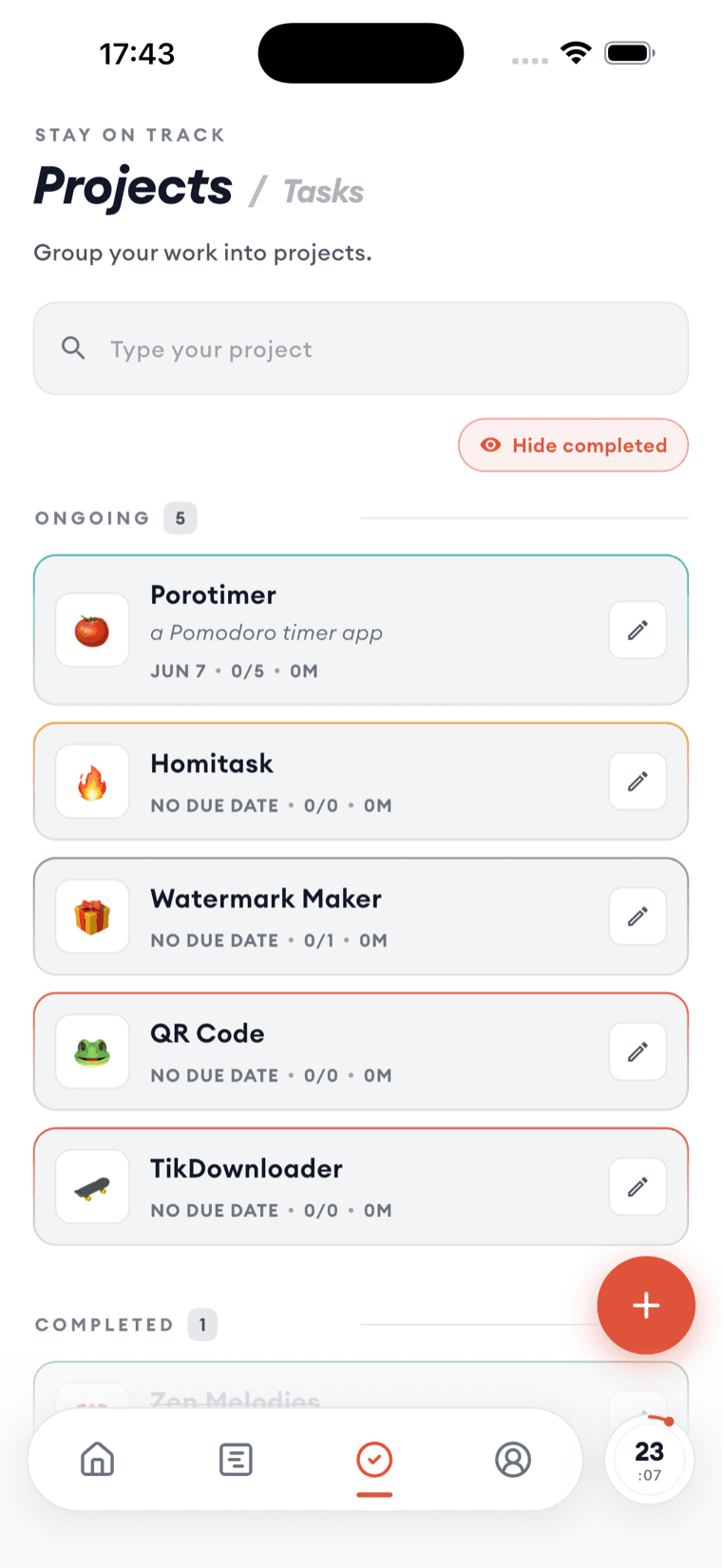
Each row carries two numbers worth watching: how many of its tasks are done, and how much time you have actually tracked against it. Ongoing and completed projects are separated, so the list does not grow into a graveyard.
The tracked-time number is the honest one. Task counts measure how you split the work up; tracked time measures where the hours went, which is usually the more surprising of the two.
Attaching a task to a session
The task sits under the countdown on the timer, and travels with the session — onto the Lock Screen card while it runs, and into the session log once it finishes.
That chain is the reason to name the task at the start. Without it, the progress view can tell you that you focused for four hours, but not on what.