
Flows
Named templates that set the rhythm of a session — focus, short break, long break.
A flow is a cadence with a name. It fixes three lengths — focus, short break, long break — and whether the timer ticks, so you are not rebuilding the same settings every morning.
The flow you are running shows above the countdown, with its own one-line description underneath.
The built-in templates
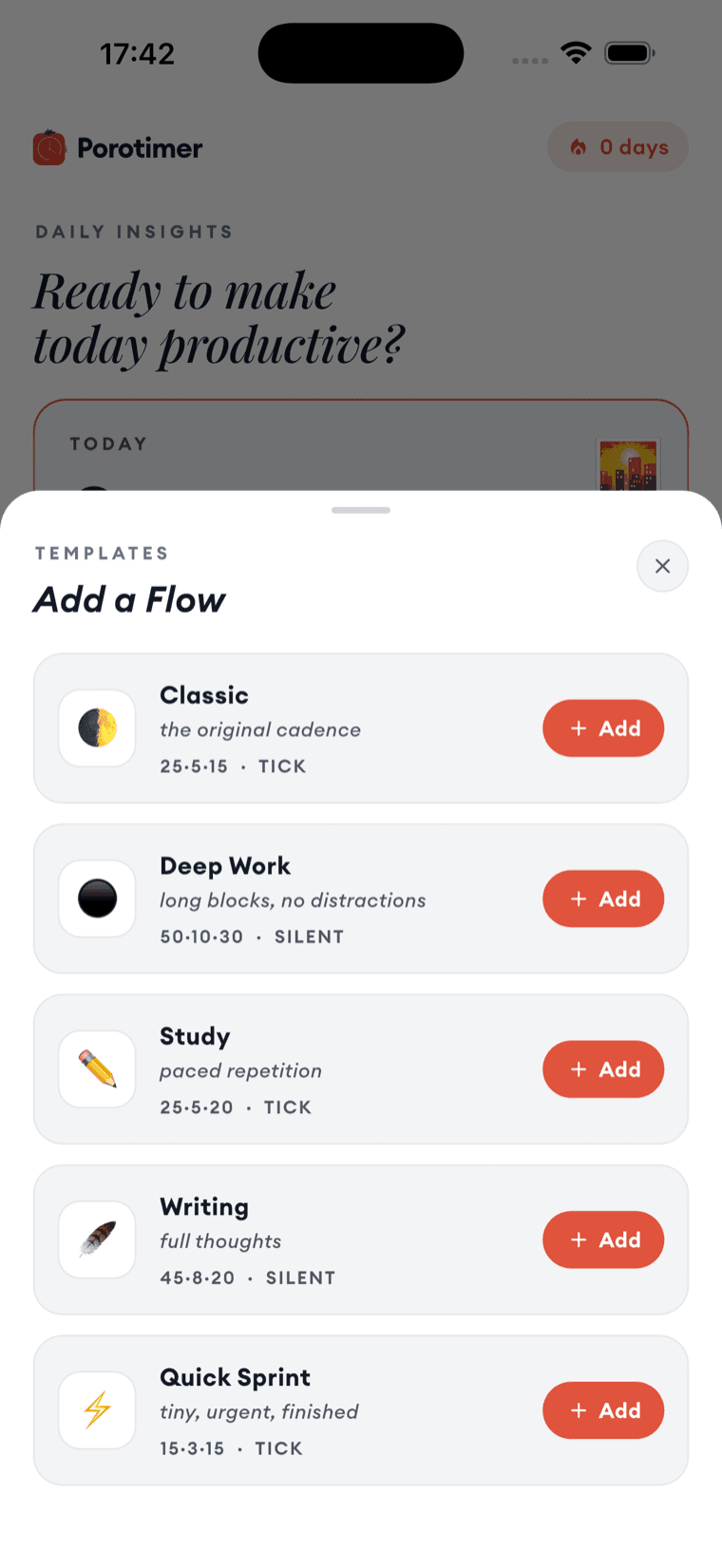
| Flow | Cadence | Sound | For |
|---|---|---|---|
| Classic | 25 · 5 · 15 | Tick | The original Pomodoro rhythm |
| Deep Work | 50 · 10 · 30 | Silent | Long blocks, no distractions |
| Study | 25 · 5 · 20 | Tick | Paced repetition |
| Writing | 45 · 8 · 20 | Silent | Room for a full thought |
| Quick Sprint | 15 · 3 · 15 | Tick | Something small, urgent, finished |
The three numbers are focus, short break and long break in minutes.
Picking one
Add a template and it becomes yours to run. You can also start straight from the home screen, which offers your current flow and its length on one button.
Start with Classic even if the numbers look wrong for your work. It is easier to judge whether 25 minutes is too short after a day of it than before.
Choosing between them
The differences that matter are length and silence, and they interact. Long blocks with a tick tend to grate; short blocks in silence can drift. Deep Work and Writing are silent because a 45- or 50-minute tick is a lot of ticking.
If you are not sure which you want, the durations are all adjustable on the timer itself — you do not have to commit to a flow to change a single sprint.