
Live Activities and notifications
The running session on your Lock Screen and Dynamic Island, and the alerts that end it.
Once a session is running you should not need to open Porotimer to know where you are. The session appears on the Lock Screen and in the Dynamic Island, counting down on its own.
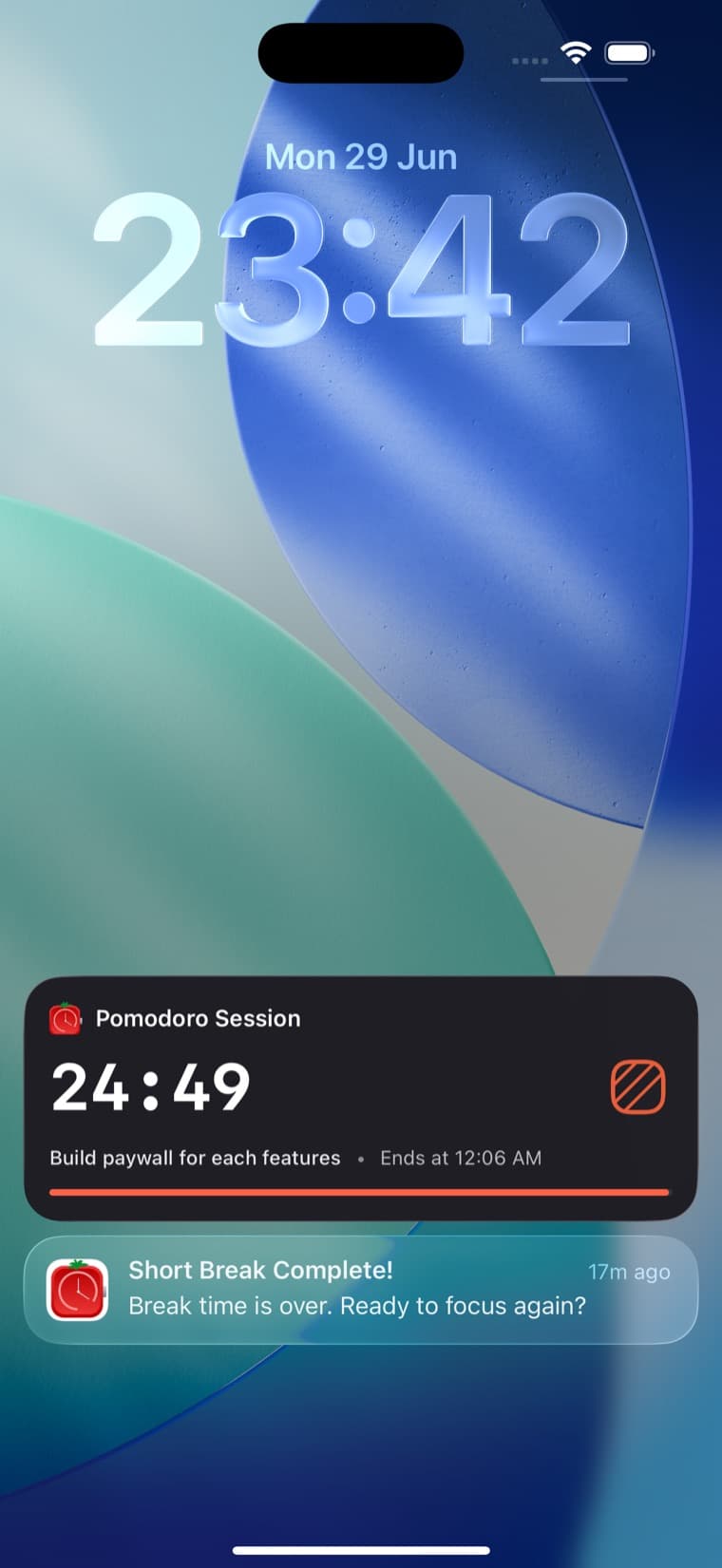
What the card shows
| Part | What it tells you |
|---|---|
| Title | Which phase is running — focus, short break or long break |
| Countdown | Time left in this phase |
| Task | What the session is attached to |
| Ends at | The clock time it finishes, so you can plan around it |
| Progress bar | How far through you are, at a glance |
The card is colour-coded by phase, so you can read it without reading it: orange for a focus session, green for a short break, gold for a long one.
Notifications
When a phase ends, Porotimer tells you — Short Break Complete! Break time is over. Ready to focus again? — so a break cannot quietly become half an hour while you are looking at something else.
This matters more for breaks than for sprints. A sprint ends and you notice, because you are working. A break ends and nothing happens, unless something tells you.
If the notification arrives and you are mid-sentence, finish the sentence. The point of the alert is to stop the break from drifting, not to interrupt the work that follows it.
Widgets
Separately from Live Activities, Porotimer has home screen widgets — a Quick Home widget that starts and tracks a session without opening the app, plus weekly and monthly stats. See iOS v1.0.9.